

Ahrefs vs KWFinder: Best for Keyword Research?
Ahrefs vs KWFinder compared for keyword research, SERPs, competitor analysis, content planning, rank tracking, ease of use, and pricing.


If you've narrowed your keyword research options down to two, there's a good chance they're Ahrefs and KWFinder. They're two of the most recommended tools in SEO forums and YouTube tutorials, but they're built for genuinely different jobs, and that's the part most comparison posts skip.
Quick answer: Ahrefs and KWFinder both do keyword research, but they're solving different problems. Ahrefs is a broad SEO intelligence platform, keyword research is one piece alongside backlink analysis, competitor research, and site auditing. KWFinder (part of the Mangools suite) is a focused keyword-discovery tool built to surface low-competition opportunities quickly, without the learning curve of a full SEO suite. If you need a complete SEO toolkit that covers backlinks, technical audits, and competitive intelligence, Ahrefs is the stronger long-term investment. If keyword research is your main job and you want something simple and affordable, KWFinder gets you there faster.
| Choose Ahrefs if... | Choose KWFinder if... | |
|---|---|---|
| Scope | You need keyword research plus backlinks, site audits, and competitor intelligence | Keyword research is your primary or only SEO task |
| Budget | You can justify $29–$249+/month for a full platform | You want a lean tool starting around $29–$129/month |
| Experience level | You're comfortable with a data-dense interface | You want something usable in your first session |
| Team size | You're running an agency or in-house SEO program | You're a solo blogger, freelancer, or small content team |
Do you need either of these tools if your real bottleneck is turning keyword ideas into published content? That question comes up later in this article, because it changes the answer.
Ahrefs vs KWFinder at a Glance
| Category | Ahrefs | KWFinder (Mangools) |
|---|---|---|
| Primary job | Full SEO intelligence suite (keywords, backlinks, audits, competitor research) | Focused keyword discovery and difficulty scoring |
| Keyword research | Deep, 28.7 billion+ keyword database, clickstream-adjusted volumes, keyword clustering | Strong for long-tail and low-competition discovery, smaller ~2.5 billion keyword database |
| Keyword difficulty | Calculated primarily from referring domains to top-10 pages | Calculated from Link Profile Strength (Majestic Citation Flow/Trust Flow) of top-10 pages |
| SERP analysis | Deep - SERP history, intent detection, ranking-page breakdowns | Clean visual SERP snapshot with core on-page and authority metrics |
| Competitor research | Extensive - Content Gap, Content Explorer, Site Explorer | Basic - SiteProfiler and "search by domain" for competitor keywords |
| Backlink analysis | Industry-leading - one of the largest link indexes and fastest refresh rates | Included via LinkMiner, but a much smaller index than Ahrefs |
| Site auditing | Yes - Site Audit with crawl credits and always-on monitoring | Not included |
| Rank tracking | Yes - weekly updates on free and paid plans | Yes - via SERPWatcher, daily/weekly depending on plan |
| Ease of use | Moderate to steep learning curve | Beginner-friendly, minimal setup |
| Best for | Agencies, in-house SEO teams, competitive niches | Bloggers, solopreneurs, small content teams |
| Pricing | $29/mo (Starter) up to $1,499/mo (Enterprise) - see the official Ahrefs pricing page | $30.50-$70.50/mo (annual) - see the official Mangools pricing page |
What We're Actually Comparing
"Feature count" isn't the same as "usefulness," and a lot of Ahrefs vs KWFinder comparisons quietly conflate the two. Ahrefs will win almost every line-item feature comparison because it's a bigger platform. That doesn't make it the right tool for every job.
To keep this fair, the comparison below is built around eight criteria that actually affect a working SEO or content process:
- Keyword discovery and filtering
- Keyword difficulty and SERP interpretation
- Competitor research
- Backlink intelligence
- Content planning usefulness
- Rank tracking and monitoring
- Ease of use and learning curve
- Price-to-usefulness for different types of users
The winner changes depending on which of these eight jobs you're trying to get done. which is why this article gives you audience-specific verdicts instead of a single blanket answer.
Ahrefs: What It Does Best
Keyword research
Ahrefs' Keywords Explorer draws on data from AhrefsBot, one of the web's most active independent crawlers, and layers in related terms, search volume and traffic estimates, SERP analysis, and competitor keyword discovery in one interface. If you want to see every keyword a competitor ranks for, cluster them by topic, and filter by search intent, this is where Ahrefs pulls ahead of a keyword-only tool.
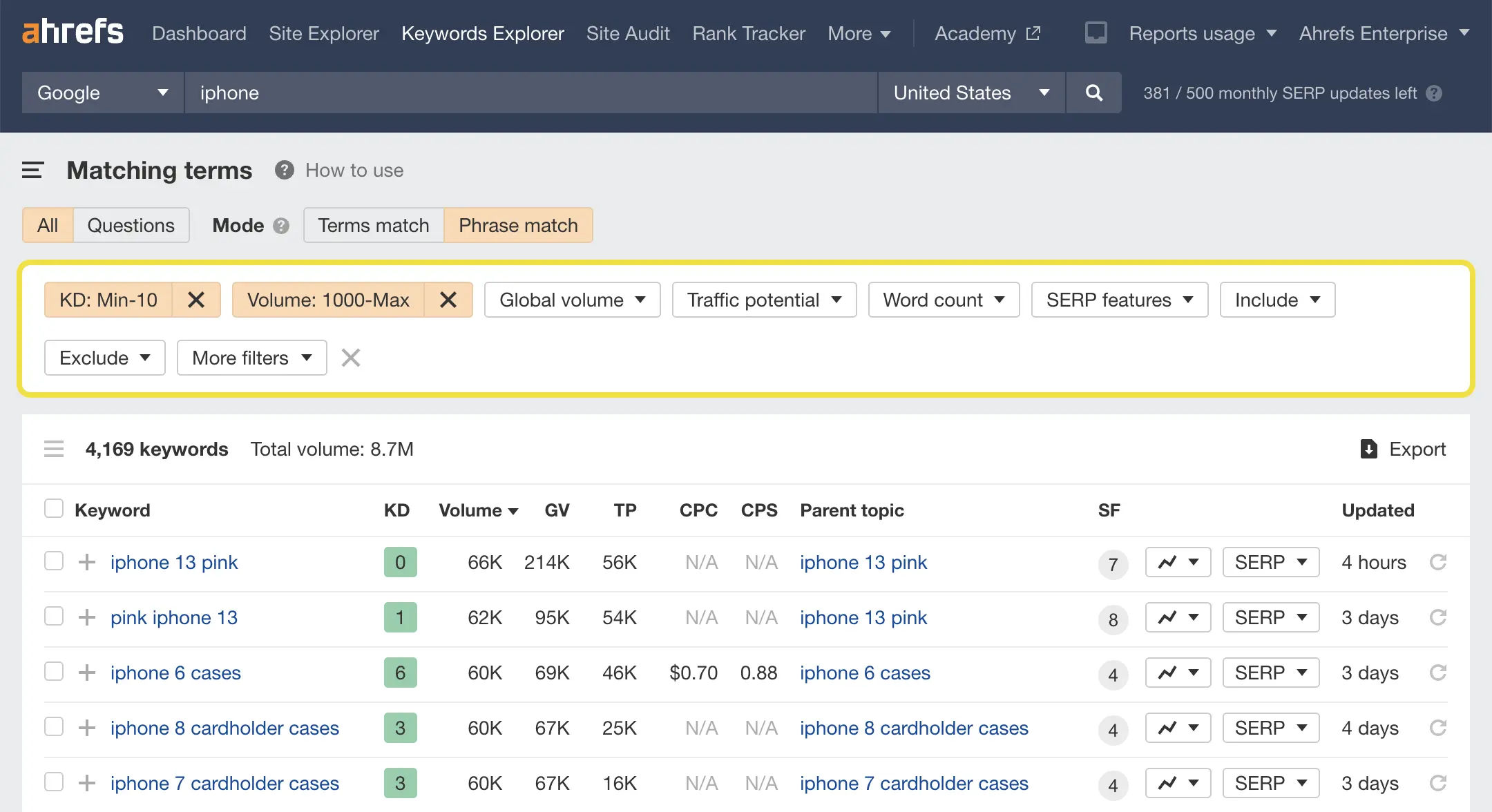 Ahrefs Dig deeper with filters for cost-per-click (CPC), SERP features, word count, and more
Competitor and backlink research
This is where the gap between the two tools is widest. Ahrefs built its reputation on backlink data, its 15–30 minute backlink data refresh rate is widely cited as unmatched for near-real-time link monitoring. Content Explorer, Content Gap, and Site Explorer let you see not just what competitors rank for, but who links to them and why those pages are winning.
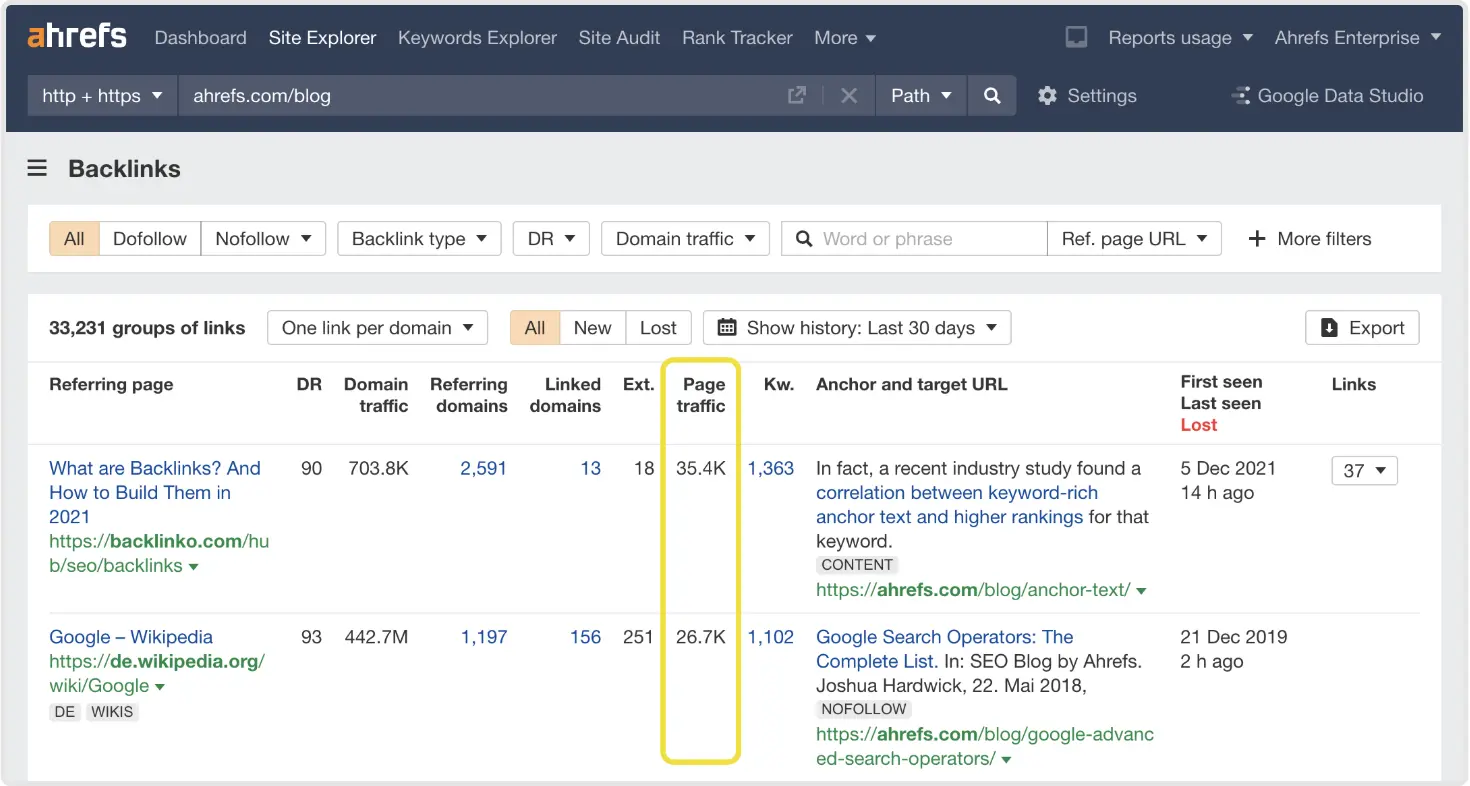 See estimated organic traffic to the linking page on Ahrefs Site Explorer
Site auditing and broader SEO workflow
Once you need technical SEO, crawl errors, broken links, Core Web Vitals issues, always-on site monitoring, Ahrefs becomes a genuinely different category of tool than KWFinder. Site Audit, GSC Insights, and Rank Tracker turn Ahrefs into an ongoing SEO operations dashboard rather than a one-off research tool.
Ahrefs limitations
The honest downsides matter here:
- The interface has a real learning curve - new users often spend their first sessions figuring out where things live before doing any actual keyword research.
- Pricing has historically been a barrier: the entry-level Starter plan is $29/month, but the first "unlimited-credit" tier most solo users actually need Standard runs $249/month.
- Much of the platform's depth (Content Explorer, Portfolios, Batch Analysis) goes unused by bloggers and solo creators who only need keyword ideas and a difficulty score.
- If your only job is finding keywords, you're paying for a lot of platform you won't touch.
Ahrefs is strongest when SEO research goes beyond finding keywords.
KWFinder: What It Does Best
Keyword discovery
KWFinder does one thing and does it fast: you enter a seed keyword, pick a location, and get a color-coded difficulty score alongside related and long-tail suggestions within seconds. For content creators who need to move from "topic idea" to "list of realistic keywords" quickly, that speed is the entire value proposition. It's also built with strong local SEO support, letting you research keywords for specific cities or regions across tens of thousands of locations.
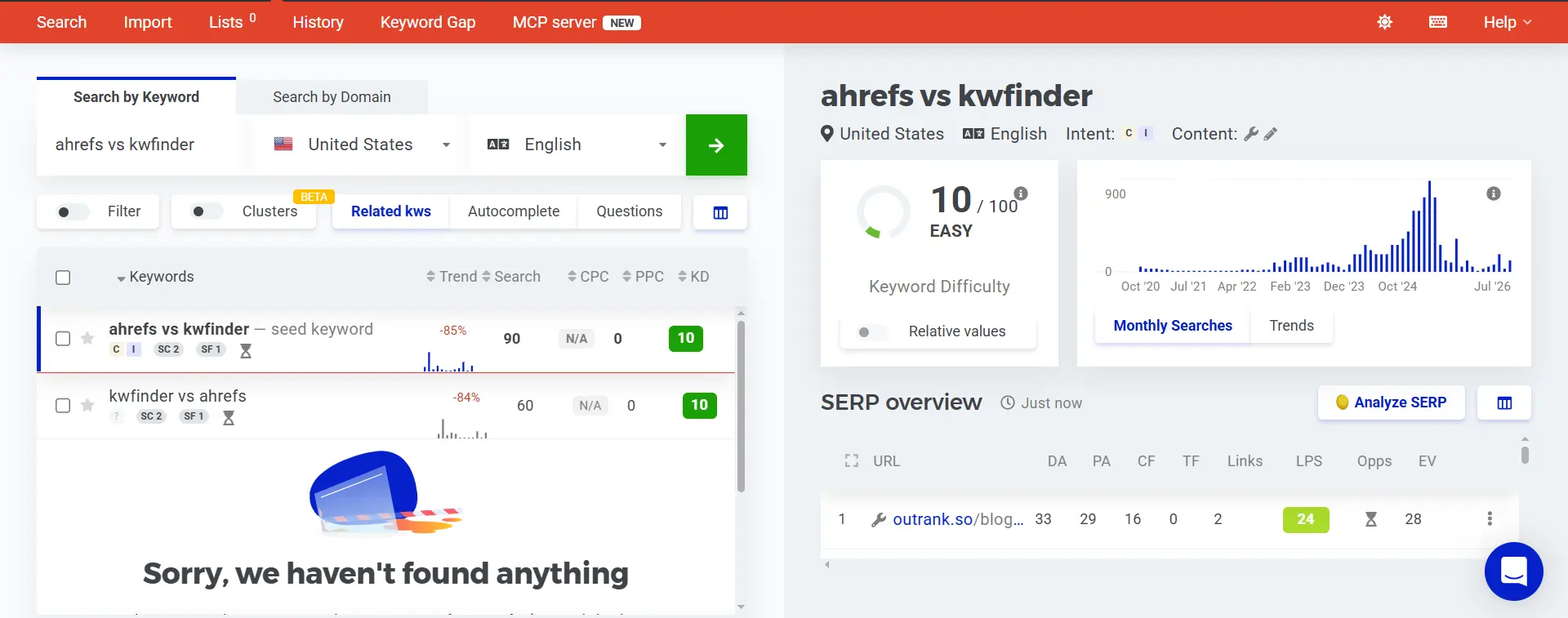 Kwfinder's key research dashboard
TechRadar's independent review sums it up as a tool that gives beginners and mid-size businesses what they need to find better keywords and improve their search ranking, while flagging that the lower-priced plans come with real feature limits.
Simplicity and learning curve
A smaller, single-purpose tool isn't a compromise when the job itself is narrow. KWFinder's interface puts search volume, keyword difficulty, and SERP data in front of you with almost no configuration, which is why it's consistently recommended as a first SEO tool for beginners.
Where KWFinder starts to fall short
The tradeoffs show up once your job expands past keyword discovery:
- No Site Audit tool, so technical SEO issues go undetected.
- A meaningfully smaller backlink index than Ahrefs, which limits deep link-building or competitor-gap research.
- No API access on any plan, which matters if you're trying to pipe keyword data into another workflow.
- Competitor research is limited to domain-level keyword overlap - there's no equivalent to Ahrefs' Content Gap or Content Explorer.
KWFinder is strongest when the main problem is finding useful keywords quickly without a heavy SEO platform.
Ahrefs vs KWFinder: Keyword Research Head-to-Head
This is the section that should directly answer why you searched "ahrefs vs kwfinder" in the first place.
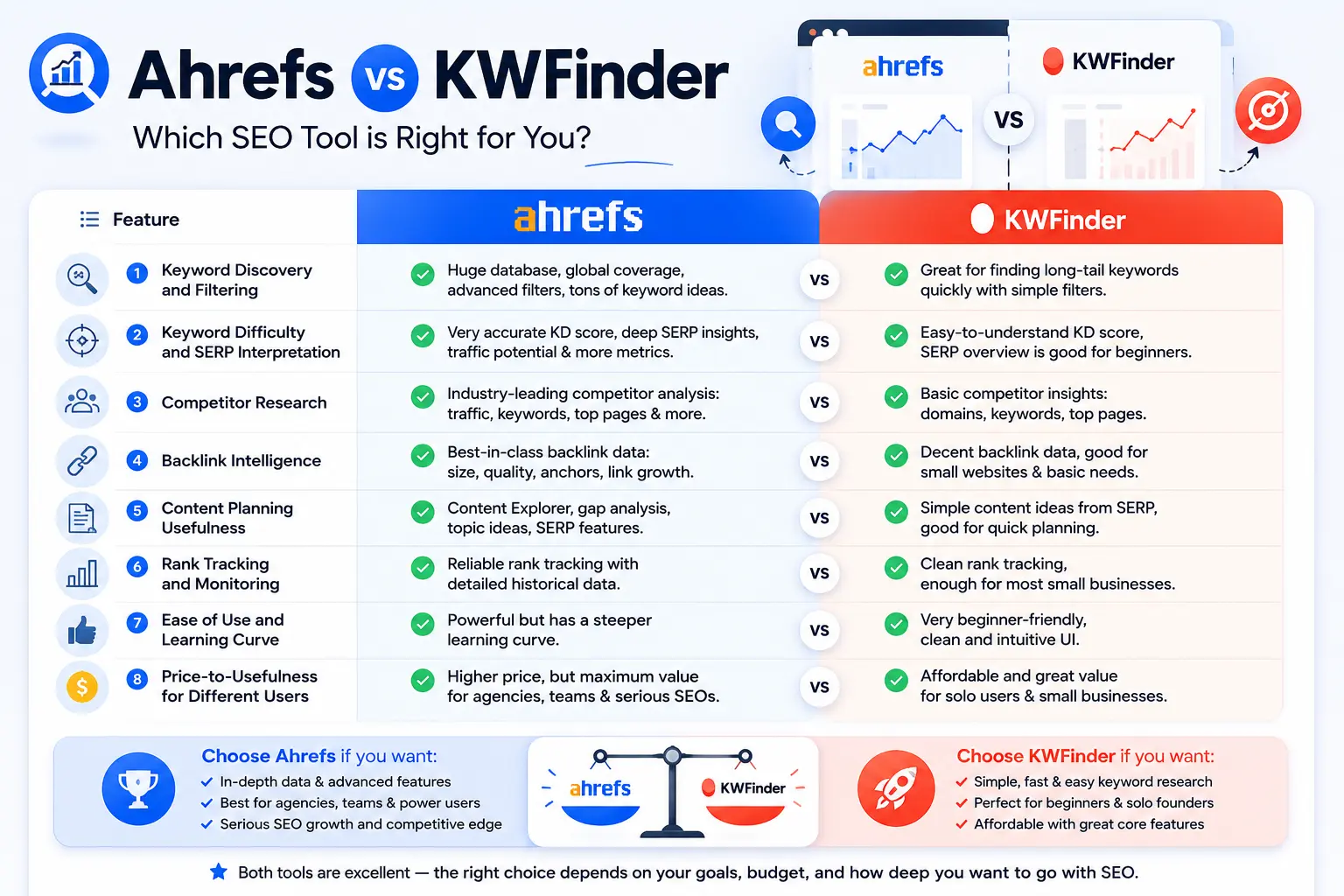 Ahrefs vs KWFinder comparison across 8 key SEO features
Keyword discovery
Both tools generate related terms, autocomplete-style suggestions, and question-based keywords from a seed term. Ahrefs adds more filtering depth, search intent labels, keyword clusters ("parent topics"), and the ability to pull ideas straight from a competitor's ranking keywords. KWFinder trades that depth for speed: fewer filters, but a faster path from seed keyword to a usable shortlist.
Keyword filtering
Ahrefs lets you filter by difficulty, volume, clickstream-adjusted traffic potential, SERP features, and search intent in the same view. KWFinder's filtering is simpler, primarily volume, trend, and its Keyword Difficulty (KD) score, which is exactly what makes it approachable, but it also means you'll do more manual SERP-checking to validate intent.
Long-tail keyword research
Both tools are genuinely good at surfacing long-tail opportunities, but the audiences differ. Agencies and larger content teams tend to prefer Ahrefs' clustering because it groups long-tail variants under a single content target automatically. Solo bloggers and smaller sites tend to prefer KWFinder's flat, scannable list because it's faster to act on without a clustering step.
SERP analysis
Ahrefs' SERP overview shows historical ranking movement, referring domains per result, and estimated traffic per ranking page, useful for understanding why a page ranks, not just that it ranks. KWFinder's SERPChecker gives a clean snapshot of the same top-10 results with core authority and on-page metrics, which is enough to sanity-check a keyword without the deeper trend data.
Finding realistic opportunities
A keyword score from either tool is a starting point, not a verdict. The single most useful habit in keyword research, regardless of which tool you use is this:
Don't choose a keyword only because one tool labels it "easy." Look at the ranking pages, intent match, content quality, site strength, and the type of pages Google is rewarding.
A KD of 15 next to ten pages from DR 70+ domains with fresh, in-depth content is not actually an easy target for a new site. Tool scores are directional signals, not guarantees, a point echoed across independent reviews of both platforms.
Ahrefs vs KWFinder: Is Keyword Difficulty Actually Comparable?
This is one of the most common points of confusion in keyword research, and it deserves its own section rather than a line in a feature table.
Why the scores differ: Ahrefs' Keyword Difficulty is calculated almost entirely from the number of referring domains pointing to the top-10 ranking pages. KWFinder's KD is calculated from what Mangools calls Link Profile Strength, a blend of Majestic's Citation Flow and Trust Flow data for those same top-10 pages. They're measuring related but not identical things, using different underlying link databases. That's why the same keyword can show a KD of 28 in one tool and 41 in the other, neither number is "wrong," they're just not the same metric wearing different clothes.
What this means practically:
- Never compare a raw score from one tool directly against a score from the other as if they were on the same scale.
- Treat both scores as relative signals within their own tool, useful for ranking keyword opportunities against each other inside Ahrefs, or inside KWFinder, but not for cross-tool comparison.
- SERP inspection is not optional. A low difficulty score still requires you to open the top-10 results and check what's actually ranking, content depth, page type, and site authority all matter more than the number itself.
- A brand-new site with little authority should treat any KD above roughly 20–30 with caution in either tool, regardless of what the "easy" threshold in the interface suggests. An established domain can often push into higher-scored territory the same tool would flag as risky for a newer site.
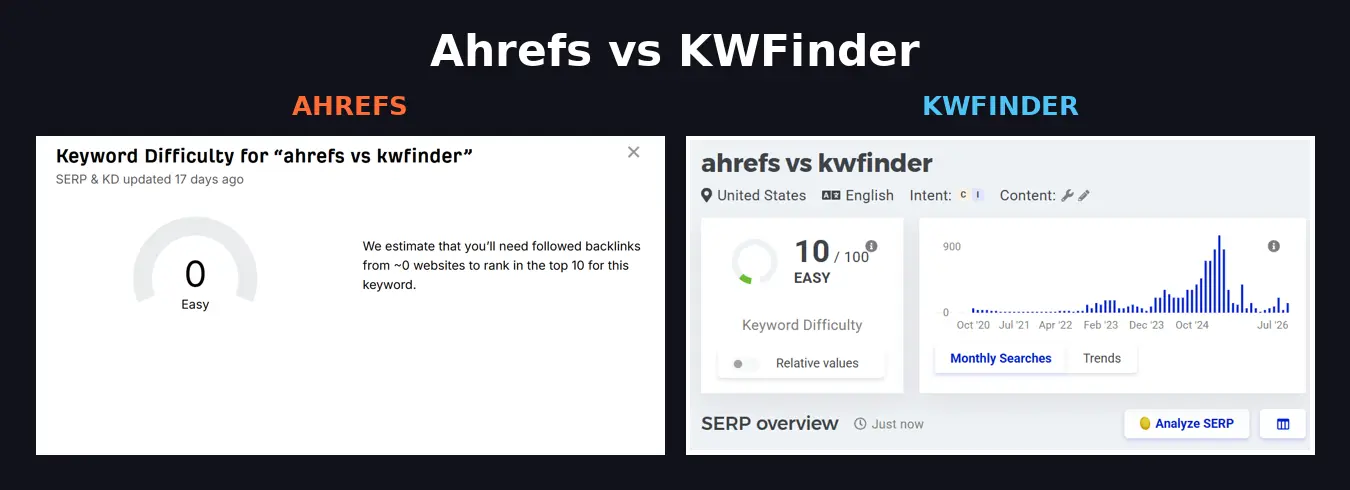 Keyword difficulty comparison - Ahrefs shows 0/100 vs KWFinder's 10/100 for the same keyword
Ahrefs vs KWFinder for Content Planning
Keyword research is step one, not the whole job. A realistic content workflow looks like this:
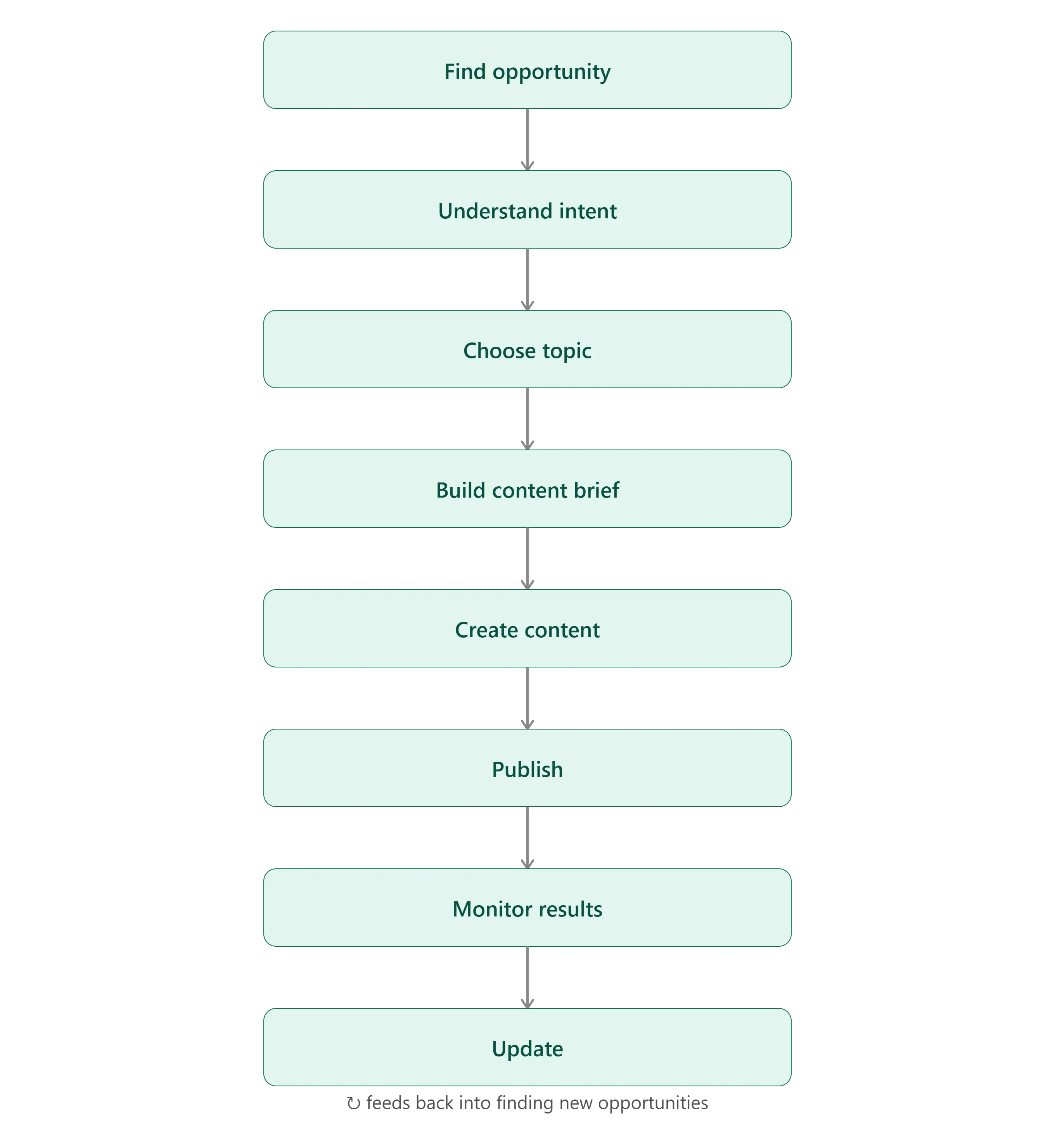 The content strategy workflow, from finding opportunity to publishing, monitoring, and updating over time
Neither Ahrefs nor KWFinder was built to own that entire chain:
- Ahrefs is the stronger research and competitive-intelligence layer - it tells you what to target and why, with data to back a content brief.
- KWFinder is a lighter keyword-discovery layer, it tells you what to target, quickly, without much supporting research depth.
- Neither automatically turns a keyword list into a published article. Both hand the research back to you, and you (or your team) still have to write, format, optimize, and publish.
The real gap is between “here’s your keyword” and “here’s your published, optimized article.” What happens in between, research, content planning, optimization, publishing, and monitoring is where the workflow starts to matter more than any single tool. That’s also the distinction we explore in our breakdown of the best SEO automation tools in 2026, where research and execution are treated as two different parts of the same SEO process.
Where LLaMaRush fits
Ahrefs or KWFinder can help you decide what to target. LLaMaRush becomes relevant once the question changes from "which keyword should I target?" to "how do I turn that opportunity into published content and keep the publishing cadence going?" It connects to Google Search Console, uses your actual ranking data to find content opportunities, and generates and optionally auto-publishes the resulting articles on a schedule. You can manually add the keyword and topic and it will generate fully optimized article for you. It's not a replacement for keyword research depth, it's the next step after the research is done, and it doesn't claim to out-research a dedicated keyword tool.
Ahrefs vs KWFinder for Competitor Research
If competitor intelligence is a real part of your job, not just "what keywords does this domain rank for," but content gaps, backlink sources, and what's actually working for a rival site, this category isn't close.
- Competitor keyword discovery: Ahrefs' Site Explorer shows a competitor's full organic keyword footprint with historical ranking trends; KWFinder's domain search shows a more limited snapshot.
- Content gaps: Ahrefs' Content Gap tool directly surfaces keywords multiple competitors rank for that you don't. KWFinder has no direct equivalent.
- SERP competitor analysis: Both tools show you the current top-10, but Ahrefs adds historical ranking movement and referring-domain counts per result.
- Backlink and authority research: Ahrefs' link index is substantially larger than LinkMiner's, which matters if you're trying to reverse-engineer why a competitor outranks you, not just that they do.
Verdict: Ahrefs wins clearly when competitor intelligence is a major part of the job. This isn't a category where a workflow tool like LLaMaRush is a natural substitute, it's a research depth question, and Ahrefs is built for it.
Ahrefs vs KWFinder for Bloggers, Solopreneurs, Agencies, and Growing SaaS Teams
| User | Better fit | Why |
|---|---|---|
| Beginner blogger | KWFinder | Fast learning curve, affordable entry price, enough keyword depth for a single site |
| Content-focused solopreneur | KWFinder (or Ahrefs Starter) | Keyword research is the main job; a full platform is more than needed |
| Freelance SEO | Ahrefs | Client work usually needs backlink data and competitor research, not just keywords |
| SEO agency | Ahrefs | Scale, client reporting, and competitive intelligence justify the higher tiers |
| SaaS content team | Ahrefs (Standard tier or above) | Competitor gap analysis and content clustering matter at scale |
| Team focused mainly on publishing | Neither alone - pair research with an automation layer | The bottleneck isn't finding keywords, it's shipping content consistently |
Ahrefs vs KWFinder Pricing: What Are You Actually Paying For?
Pricing changes on both platforms fairly often, so treat the numbers below as a snapshot and confirm against the Ahrefs pricing page and Mangools pricing page before you decide.
| Feature | Ahrefs | KWFinder / Mangools |
|---|---|---|
| Starting Price | $29/month - Starter | $30.50/month - Basic |
| Mid-Tier Price | $129/month - Lite | $40.50/month - Premium |
| Higher-Tier Price | $249/month - Standard, $449/month - Advanced, $1499/month - Enterprise | $70.50/month - Agency |
| Best For | SEO professionals, agencies & serious teams | Freelancers, founders & small teams |
| Best Value | When you need an all-in-one SEO platform | When keyword research is the main priority |
Two questions worth asking before you subscribe to either:
If you only need keyword research, are you paying for capabilities you won't use? A $249/month Ahrefs Standard plan includes site auditing, deep backlink data, and competitive intelligence, genuinely valuable if you'll use it, dead weight if you won't.
If you need backlinks, audits, and competitive research, will a cheaper keyword tool leave you buying several extra tools later? KWFinder's ~$30.50-70.50/month price tag looks great in isolation, but if you later need site audits or serious backlink data, you'll be adding a second (or third) subscription on top.
Which One Should You Choose?
Choose Ahrefs if:
- You need deep competitor and backlink research, not just keyword ideas
- You manage a broader SEO program across multiple sites or clients
- You want a complete SEO suite rather than a point solution
- You're comfortable investing time in a more advanced platform
Choose KWFinder if:
- Keyword research is your main or only SEO job
- You prioritize simplicity and a short learning curve
- You want to find low-competition opportunities without wading through unrelated features
- You don't currently need deep backlink or technical SEO analysis
Consider a different piece of the workflow if:
- Your real bottleneck isn't "which keyword should I target" but "how do I actually get content written, optimized, and published consistently"
- You want automation in the content-production step rather than another research dashboard
If that last point sounds familiar, it's worth reading LLaMaRush vs SurferSEO, it covers the same research-tool-vs-execution-tool distinction from a slightly different angle, comparing a content optimization platform against a done-for-you publishing workflow.
Can You Use Ahrefs and KWFinder Together?
This is a fair question, because plenty of SEOs do run more than one tool.
Ahrefs for deep research + KWFinder for fast keyword discovery is a workable combination, some freelancers use KWFinder for quick daily ideation and reserve Ahrefs for deeper competitor and backlink work on client projects. But for most individual users, running both is redundant: if you're already paying for Ahrefs, its Keywords Explorer covers everything KWFinder does and more, so a second keyword tool doesn't add much.
When using both makes sense: you're on Ahrefs Lite or Starter (where credits are metered) and want unlimited-feeling quick keyword lookups without burning Ahrefs credits on every idea.
When a single tool is enough: almost everyone else. Pick based on the job, research depth vs. speed and simplicity, rather than trying to cover every base with two subscriptions.
A third scenario worth naming: research tool + content automation workflow. Instead of stacking two research platforms, some teams pair one keyword tool (either one) with a publishing layer that turns validated opportunities into scheduled content, which is the gap LLaMaRush and similar automation tools are built to close. That's a different kind of "using two tools together" than running Ahrefs and KWFinder side by side, and for teams whose bottleneck is publishing rather than research, it's usually the more useful pairing.
Frequently Asked Questions
Q1: Is Ahrefs better than KWFinder?
A1: Ahrefs is more powerful overall because it covers backlinks, site audits, and competitor research alongside keyword data. KWFinder isn't "worse", it's narrower by design. Whether Ahrefs is "better" depends on whether you need that extra scope.
Q2: Can KWFinder replace Ahrefs?
A2: Only if your SEO work is limited to keyword research. KWFinder has no site audit tool, a much smaller backlink index, and lighter competitor research, so it can't fully replace Ahrefs for agencies or teams doing broader SEO work.
Q3: Which is better for beginners, Ahrefs or KWFinder?
A3: KWFinder. Its interface is built to get a new user to a usable keyword list in minutes, while Ahrefs' depth means a real learning curve before you're using it efficiently.
Q4: Which tool is better for finding low-competition keywords?
A4: Both are genuinely good at this, and KWFinder was built specifically for it. The bigger factor is remembering that neither tool's "easy" label replaces checking the actual SERP.
Q5: Is Ahrefs better for competitor research?
A5: Yes, clearly. Content Gap, Content Explorer, and its larger backlink index give Ahrefs a meaningful edge for anything beyond basic domain-level keyword overlap.
Q6: Why do Ahrefs and KWFinder show different keyword difficulty scores?
A6: They use different data and methodologies, Ahrefs weighs referring domains to the top-10 pages, while KWFinder's score is based on Link Profile Strength using Majestic's Citation Flow and Trust Flow data. They're not on the same scale, so don't compare the raw numbers directly.
Q7: Do you need Ahrefs if you only do keyword research?
A7: Probably not the more expensive tiers. If keyword research is genuinely your only SEO task, KWFinder (or Ahrefs' $29/month Starter plan) covers it without paying for unused platform depth.
Q8: Which is better for content planning?
A8: Neither tool plans or produces content on its own, both hand research back to you. Ahrefs gives you more supporting data for a content brief; KWFinder gets you to a keyword shortlist faster. If the actual bottleneck is turning that research into published articles, that's a separate workflow question from which research tool you pick.
Final Verdict
Ahrefs and KWFinder aren't really competing for the same job, even though they both show up in the same "keyword research tool" searches. Ahrefs is the stronger choice for broader SEO intelligence, competitor research, backlinks, technical audits, and keyword data in one platform, at a price that reflects that scope. KWFinder is the stronger choice for focused, fast keyword research on a budget, especially if you're newer to SEO or running a single site where deep competitive intelligence isn't the priority.
Neither tool, on its own, turns keyword research into published content, that's a separate step in the workflow, and it's where a platform like LLaMaRush becomes relevant for teams whose bottleneck has shifted from "what should I write about" to "how do I keep publishing consistently."
Thanks for reading! ❤️
Written by
JenishRead Next




Turn this into your AI Search strategy
LLaMaRush creates SEO, AEO, and GEO optimized content built to rank in Google and get cited by AI answer engines.
Start Ranking Everywhere